



A visitor lands on a product detail page from a Google search. The product is exactly right, the images are convincing, the price works. Then comes the line: “Item not available.” The tab closes, the session ends. No cart, no address, no second chance.
This happens daily in many shops – and it leaves no trace. An abandoned cart triggers a reminder email. A drop-off in the checkout shows up in reporting. A sold-out product, by contrast, produces nothing but a silent exit. That is precisely why it is the revenue loss that gets quantified least often and underestimated most.
The loss is bigger than the missed order
At first glance the case looks harmless: the goods are not there, the sale does not happen, and once stock is replenished business continues. Three effects, however, make the calculation considerably less comfortable.
The traffic has already been paid for. Whether through paid search budget, price comparison portals, newsletters or years of SEO work – the visitor on the sold-out page cost money. The conversion of that visit is zero; the costs are incurred regardless. Sold-out items with good rankings are therefore structural budget destroyers.
The customer still buys – just somewhere else. Someone searching for a specific product usually buys it the same day. The order is not lost, it goes to a competitor. And there a customer account is created, a positive delivery experience is made, and the next time the need arises, that shop is entered directly. What is lost is not one order, but a customer lifetime value.
The damage keeps running. Sold-out products keep their rankings, their backlinks and their placement in comparison portals. They continue to attract qualified traffic – and reliably convert it into bounces for as long as nothing changes.
Three common workarounds and their weaknesses
Hiding the product. The classic choice, because it can be done immediately. It solves the problem only visually, though: rankings collapse, backlinks lead nowhere, and after relisting, visibility often starts from zero. With seasonal or frequent unavailability this causes lasting damage to the organic channel.
A “back in stock soon” notice. Honest and correct – but the entire responsibility rests with the visitor, who would have to remember which shop and which product it was and return of their own accord. In practice that rarely happens.
A manual list via the contact form. Works up to a handful of enquiries. After that, messages get overlooked, incoming goods are not reconciled with the list, and customers are informed too late or not at all. The effort grows linearly with success – a procedure that fails precisely when it would start to pay off.
Capturing purchase intent instead of losing visitors
The better approach inverts the perspective: if a customer cannot be served right now, their purchase intent should at least be recorded. A back-in-stock notification turns the drop-off into a lead. The visitor leaves an email address and is informed automatically as soon as the goods are back in the warehouse.
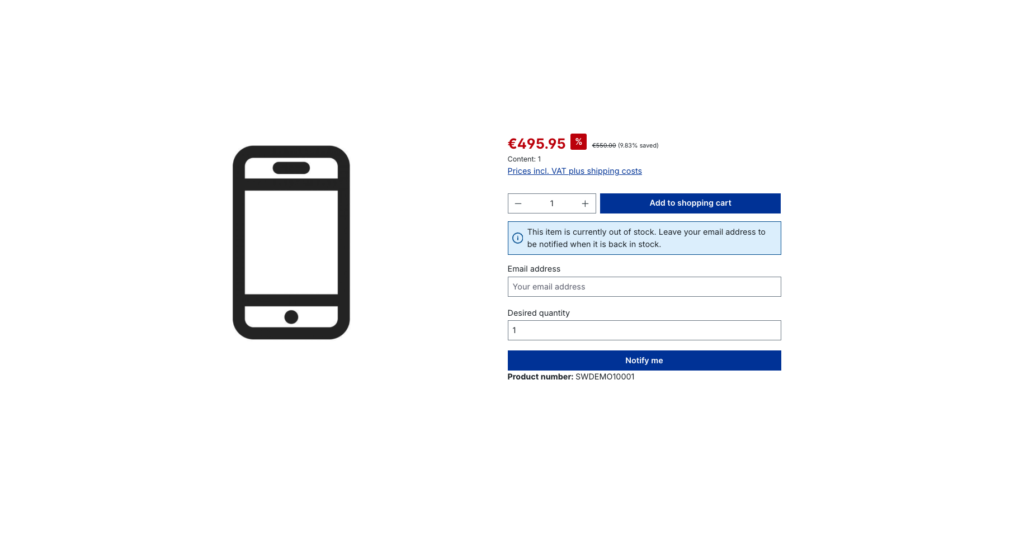
The second, frequently overlooked benefit lies in purchasing. A waiting list is the most honest demand forecast a shop can get. Forty sign-ups for a single variant are a far more reliable basis for a reorder decision than any estimate derived from historical data – because here, people who want to buy have actively raised their hands.
The order of magnitude can be calculated
Rather than relying on other people’s benchmarks, a shop-specific back-of-the-envelope calculation is worthwhile:
visitors per month on unavailable items × share that signs up for a notification × share that actually orders after the notification × average order valueThe first figure comes from the web analytics tool, the last one from shop reporting. For the two middle values, deliberately conservative assumptions are enough at first – what matters is the order of magnitude, not the second decimal place. In most shops the result is an amount that has never appeared in any report.
What a good implementation has to deliver
A sign-up form alone is not enough. What matters is that the solution addresses the typical day-to-day concerns. The Shopware plugin “Stock Reminder” by PremSoft is built precisely along these objections:
- Spontaneous purchases should not be blocked. The add-to-cart button can remain visible alongside the notification form. Anyone willing to order despite the delivery time can still do so.
- Not every goods receipt justifies an email. A dynamic product group defines the threshold for notifications – for example, only once available stock exceeds three units. A single returned item then does not trigger a mass mailing that ends up producing disappointed customers.
- Not every product needs the form. A second dynamic product group controls where it appears. Category, manufacturer, stock level and further criteria can be combined freely, so discontinued items stay out of scope.
- Misuse with other people’s addresses. An optional double opt-in requires confirmation of the email address. Where a low barrier to entry matters more, it can be switched off.
- The shop must not slow down during goods receipt. Sending runs through a scheduled task and the message queue, asynchronously in the background – even with several thousand sign-ups.
- Communication should match the brand. Sign-up, opt-in confirmation and the back-in-stock message are available as Flow Builder events. This allows custom email templates, voucher logic or notifications to internal systems.
- Data protection. Entries that have already been notified are deleted automatically after a configurable period.
- Headless operation. The entire logic sits in Store API routes and is therefore available outside the classic storefront as well.
In addition, the form can be displayed not only on the product detail page but already on the product tile in listings and search results – exactly where many visitors notice the unavailability for the first time.
The proof belongs in the backend, not in gut feeling
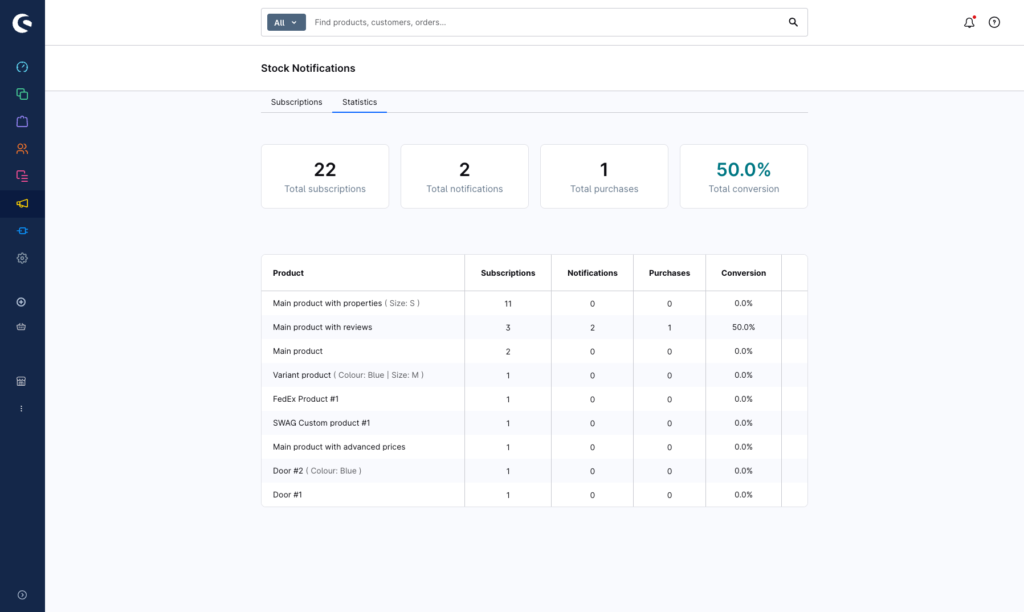
The key question is whether any of this pays off measurably. That is why the plugin records three metrics per product: the number of sign-ups, the number of notifications sent, and the number of orders resulting from them. Within a few weeks, an assumption turns into a figure in the administration: how many waiting customers were informed, and how many of them actually bought.
The same evaluation doubles as a purchasing instrument. Products with the longest waiting lists are the ones whose reorder pays for itself fastest.
Three configurations from practice
Fashion and variants. The form appears only for sold-out variants, and notifications go out only from a stock level of three units. That way the ongoing flow of returns does not trigger a wave of emails that immediately empties the shelf again.
A substitute for a pre-order process. The form is also shown for items already on their way, while the add-to-cart button stays visible. Decisive customers order right away, undecided ones leave their address.
A basis for reordering. The evaluation is exported monthly and gives purchasing a priority list: reorder first what customers are demonstrably waiting for.
Where the method reaches its limits
Back-in-stock notifications are not a cure-all. For permanently listed slow movers without demand, no waiting list forms in the first place. They also do not replace a genuine pre-order process with a binding delivery date, and they do not fix fundamental problems in inventory planning. Their value lies with products that have real demand which cannot be served temporarily – and there it is substantial.
Conclusion
Unavailability is not an accident, it is a normal state of retail. The difference lies in what happens to existing demand in that state: it is either lost, or it is captured. A sold-out item is not a lost sale – it is a postponed one, provided the email address is on file.
A sensible first step: check which of the most-visited items were unavailable over the past 90 days, and put that number into the calculation above. The result decides whether the topic is worth pursuing – and in most shops it is.
The “Stock Reminder” plugin is available for Shopware 6. The PremSoft team is happy to answer questions about setup or individual requirements.
